
Download Vertabelo – Visual Database Design Tool, SQL, Database Modeling
Overview
Vertabelo is a web-based visual database design tool focused exclusively on physical data modeling. Designed for developers and database administrators, it enables users to create, edit, and manage database schemas using intuitive diagramming techniques. The tool supports the Crow’s Foot notation, a widely recognized standard for representing relationships between database entities, making it accessible for professionals familiar with relational database design principles.
Vertabelo addresses key challenges in database development, including schema consistency, collaboration, and version control. It allows teams to work on shared models in real time, with clear role-based access—either as viewers or editors. The platform supports the creation of public links, enabling external stakeholders to review models without requiring login credentials. This feature is particularly useful for documentation, client presentations, or integration with project management tools.
Designed for use across multiple operating systems, Vertabelo runs through a web browser, eliminating the need for local installation. Its primary use cases include database schema design, SQL script generation, reverse engineering from existing databases, and collaborative database planning. The tool is especially beneficial for teams managing complex database structures across different environments.
Key Features & Capabilities
- Physical Data Modeling: Vertabelo specializes in physical data modeling, allowing users to define tables, columns, constraints, and relationships using the Crow’s Foot notation. This ensures clarity in representing entity-relationship diagrams and supports accurate database implementation.
- SQL Generation: The tool generates complete SQL scripts for creating and dropping database schemas. Users can preview the entire script or selected components, enabling precise control over deployment workflows.
- Team Collaboration: Models can be shared with team members in either read-only or editor mode. Only one user can edit the model at a time, preventing conflicts. Others can view the model in real time, ensuring transparency and alignment across team members.
- Public Link Sharing: A model can be shared via a public link, granting anyone with access read-only visibility. This feature supports documentation, client reviews, or embedding models directly into websites or wikis.
- Model Versioning: Vertabelo maintains a linear history of all model changes. Users can browse, preview, or restore previous versions, and assign custom names to specific versions for better traceability.
- Model Validation: Built-in validation checks identify errors, warnings, and tips during modeling. Issues are displayed in the Problem panel with visual indicators, helping users correct inconsistencies before deployment.
- XML Import and Export: Models or specific versions can be exported to XML format, and existing models can be imported from XML files. This facilitates backup, migration, and integration with other tools or systems.
- Database Support: Vertabelo is compatible with major database platforms including PostgreSQL 9.x, SQLite 3.7.x, MySQL 5.5, Oracle 11g, Microsoft SQL Server 2012, and IBM DB2 9.7, ensuring broad applicability across development environments.
User Interface, Workflow & Performance
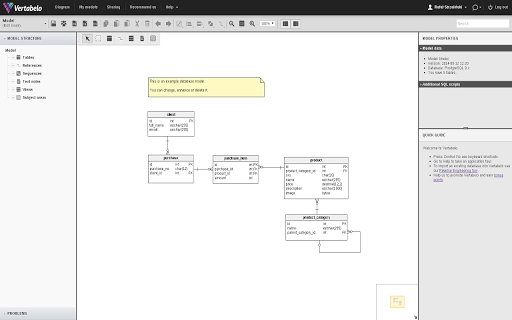
Vertabelo features a clean, browser-based interface optimized for visual database design. The workspace is divided into a diagram canvas, a model tree, and a problem panel, allowing users to navigate between structural views and real-time feedback. Navigation is intuitive, with drag-and-drop functionality for placing entities and relationships, and context menus for quick access to properties and actions.
Workflow efficiency is enhanced by real-time collaboration features and immediate feedback through the validation system. The ability to preview SQL scripts before execution supports a smooth development cycle. While the developer did not specify resource usage details, the web-based nature of the application suggests minimal local CPU and RAM consumption, as processing is handled on remote servers.
Stability is expected to be consistent due to the cloud-hosted architecture, which minimizes crashes and data loss. However, performance may vary depending on internet speed and browser compatibility. General software behavior patterns suggest reliable operation under standard network conditions.
Compatibility & System Requirements
Vertabelo is accessible on Windows, Mac, and Linux operating systems through a modern web browser. The tool does not require local installation, making it platform-agnostic and suitable for users across different environments. The installation size of 1.5 MB refers to the browser-based application footprint, which is negligible since no local files are stored.
Exact system requirements were not listed. The developer did not provide additional system requirements. Compatibility is primarily dependent on the browser’s ability to support modern web standards, including HTML5, JavaScript, and CSS3. Users should ensure their browser is up to date for optimal functionality.
Pros and Cons
Pros
- Web-based access across Windows, Mac, and Linux platforms
- Real-time team collaboration with role-based access control
- Support for multiple major databases including PostgreSQL, MySQL, Oracle, and SQL Server
- Automatic SQL script generation with preview functionality
- Model versioning with restore and naming capabilities
- Public link sharing for easy model review and embedding
- XML import/export for data portability and backup
Cons
- Only supports physical data modeling, not conceptual or logical levels
- Requires a stable internet connection for full functionality
- No offline mode available
- Limited to browser-based use, no native desktop application
- Exact performance metrics and resource usage were not specified
FAQ Section
Is Vertabelo available for offline use?
Vertabelo is a web-based application and does not support offline usage. Users must have an active internet connection to access and edit models.
Can I use Vertabelo without creating an account?
While the tool allows public model viewing without login, full editing and collaboration features require a registered account.
What databases does Vertabelo support?
Vertabelo supports PostgreSQL 9.x, SQLite 3.7.x, MySQL 5.5, Oracle 11g, Microsoft SQL Server 2012, and IBM DB2 9.7.
Is Vertabelo secure for storing sensitive database models?
As a cloud-based tool, Vertabelo employs standard web security measures. Users are advised to manage access permissions carefully, especially when sharing public links.
How often are updates released?
The developer did not specify update frequency. Users can expect updates based on feature development and platform improvements.
Final Thoughts + CTA
Vertabelo stands out as a focused, efficient tool for teams engaged in physical database design. Its strengths lie in collaborative modeling, version control, and cross-database compatibility. The ability to generate SQL scripts, validate models, and share them publicly makes it a valuable asset in development workflows.
While it lacks offline capabilities and is limited to physical modeling, its web-native approach ensures accessibility and consistency across devices. For database professionals and development teams seeking a reliable, browser-based solution, Vertabelo delivers strong functionality without unnecessary complexity.
Download Vertabelo now







